EduIQ Network LookOut Administrator Pro 5.6.3 [pac]
About EduIQ Network LookOut Administrator Pro 5.6.3 [pac]
Overview
Network LookOut Administrator lets you see all your employee PC screens without leaving your desk. Monitor the activity of all the PCs in your company remotely and execute several administrative actions with just one click. Main Features • Displaying a live picture of an employee PC. • You can take a control of a network PC by controlling its mouse and keyboard. • More remote screens can be displayed in a table. • PC desktops can be organized in groups • A remote screen can be zoomed to an actua
Features
• Displaying a live picture of an employee PC
System Requirements
Windows 7, 8, 10, or 11 (32-bit and 64-bit) https://www
Frequently Asked Questions
How do I download EduIQ Network LookOut Administrator Pro 5.6.3 [pac]?
Click the magnet or torrent download button on this page to start downloading EduIQ Network LookOut Administrator Pro 5.6.3 [pac]. A BitTorrent client is required.
What is the file size of EduIQ Network LookOut Administrator Pro 5.6.3 [pac]?
The total size of EduIQ Network LookOut Administrator Pro 5.6.3 [pac] is 128.3 MB.
How many seeders are available for EduIQ Network LookOut Administrator Pro 5.6.3 [pac]?
EduIQ Network LookOut Administrator Pro 5.6.3 [pac] currently has 21166 seeders, which affects download speed.
What category is EduIQ Network LookOut Administrator Pro 5.6.3 [pac] in?
EduIQ Network LookOut Administrator Pro 5.6.3 [pac] is listed under Applications on 1337x.
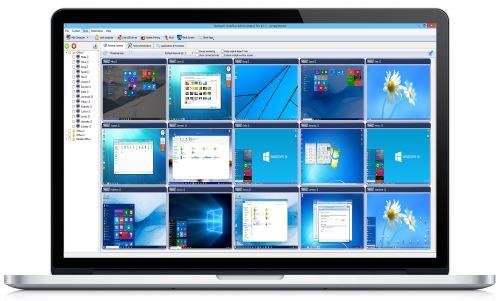
Network LookOut Administrator lets you see all your employee PC screens without leaving your desk. Monitor the activity of all the PCs in your company remotely and execute several administrative actions with just one click.
Main Features
• Displaying a live picture of an employee PC.
• You can take a control of a network PC by controlling its mouse and keyboard.
• More remote screens can be displayed in a table.
• PC desktops can be organized in groups
• A remote screen can be zoomed to an actual size.
• The name of the connected user is displayed.
• Power on/off, restart, hibernate, suspend PCs
• Log off desktop users
• Lock workstation
• Clear desktop
• Control screen-saver
• Block applications
• Mute PCs
• Limit employee PC audio volume level
• Disable printing
• Disable Ctr+Alt+Del
• Blank screen
• Start program on network connected PCs and see the output
• Open web page on network connected PCs
• Multi-monitor support
• Control over running processes and applications
• You can lock employee PCs
• When lower bandwidth is required, the refresh interval can be enlarged.
• Settings for the agent are encrypted and password protected.
• Connection to an employee PC is encrypted and password protected.
• Access to monitoring console is password protected. If more users use the same PC then different profiles and access passwords can be set.
• More monitoring consoles can be connected to the same employee PC, so you can monitor your employee from different offices.
• Agent can be remotely installed.
• Fast users switching is supported.
• Multi-session support for Remote Desktop, Terminal Services, Citrix,...
What's new
• official site does not provide any info about changes in this version
System requirements:
Windows 7, 8, 10, or 11 (32-bit and 64-bit)
https://www.virustotal.com/gui/file/6d73c9eedaf826715e2994df53fae6686ebcee8ef1ab85763920e83090253e5d
https://www.virustotal.com/gui/file/221212a45d5e8bb24d9c111c6d5dd5a559c593e48f166dec1ab15887464df1a9
https://www.virustotal.com/gui/file/de673e539cf40b288965bac9c0591bf23bd9e010e49fcab4aa437dcf6a64947b
https://www.virustotal.com/gui/file/2b54ebb2b851fb028c9c2939fde2064461cf7a7789c29bfa62c872d484891ff6