VovSoft Text to MP3 Converter 4.7 [pac]
About VovSoft Text to MP3 Converter 4.7 [pac]
Overview
Easily convert your text into speech. Perfect for e-learning, presentations, YouTube videos and increasing the accessibility. The text can be exported as MP3 and WAV files. This program uses the preinstalled Microsoft SAPI Text-to-Speech (TTS) engines for generating voice. Text to MP3 software If you need to simply convert some text into audio content or you're just looking for a way to preview some content without having to actually spend time reading it, Text to MP3 Converter can do both, offe
Features
Checkmark Speech speed (fast-slow) Checkmark Voice pitch (high-low) Checkmark Spell Checkmark Emphasize Checkmark Multiple speech engine support Checkmark Read aloud Checkmark MP3 export Checkmark WAV export Whats New System Requirements: Windows 11, Windows 10, Windows 8/8
System Requirements
Windows 11, Windows 10, Windows 8/8
Frequently Asked Questions
How do I download VovSoft Text to MP3 Converter 4.7 [pac]?
Click the magnet or torrent download button on this page to start downloading VovSoft Text to MP3 Converter 4.7 [pac]. A BitTorrent client is required.
What is the file size of VovSoft Text to MP3 Converter 4.7 [pac]?
The total size of VovSoft Text to MP3 Converter 4.7 [pac] is 20.7 MB.
How many seeders are available for VovSoft Text to MP3 Converter 4.7 [pac]?
VovSoft Text to MP3 Converter 4.7 [pac] currently has 27136 seeders, which affects download speed.
What category is VovSoft Text to MP3 Converter 4.7 [pac] in?
VovSoft Text to MP3 Converter 4.7 [pac] is listed under Applications on 1337x.
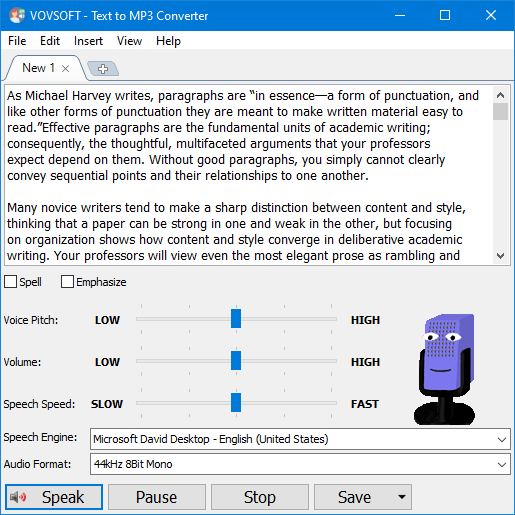
Easily convert your text into speech. Perfect for e-learning, presentations, YouTube videos and increasing the accessibility. The text can be exported as MP3 and WAV files. This program uses the preinstalled Microsoft SAPI Text-to-Speech (TTS) engines for generating voice.
Text to MP3 software
If you need to simply convert some text into audio content or you're just looking for a way to preview some content without having to actually spend time reading it, Text to MP3 Converter can do both, offering you choices for the used speech engine, as well as the output audio format. The two main options offer users the choice of increased quality (WAV) or a more compact recording (MP3). "Speech Speed" option allows from 10x slow to 10x fast playing and recording. If you seek a basic application that can help you perform text to audio conversions, without having to resort to complex steps and configuration processes, try out this simple yet quite capable software.
Key Features
Checkmark Speech speed (fast-slow)
Checkmark Voice pitch (high-low)
Checkmark Spell
Checkmark Emphasize
Checkmark Multiple speech engine support
Checkmark Read aloud
Checkmark MP3 export
Checkmark WAV export
Whats New
System Requirements:
Windows 11, Windows 10, Windows 8/8.1, Windows 7 (32-bit & 64-bit)
https://www.virustotal.com/gui/file/69a16351177f20d8addc4014b5edf653c1ac62410a4f1644c6480b42e090c11e
https://www.virustotal.com/gui/file/cc27c87050addb0ddcb5e78b497f838085f2ae9788fef1af6ba607ca6e91675d