PDF Annotator 10.0.0.1012 Multilingual by Sats99
About PDF Annotator 10.0.0.1012 Multilingual by Sats99
Overview
PDF Annotator lets the user open any PDF file and add annotations, using the mouse or a Tablet PC pen, directly on the PDF file's pages. The annotated documents can then be saved directly back to PDF format. In this way, anyone can read or print the annotated PDF documents. Annotated documents can also be easily attached to emails. Previously, annotating, commenting or proofreading a document received for review in PDF file format was possible only by using multiple software products in a row--o
Features
Annotation Manager in the Sidebar • Get a quick overview of all annotations in a document
Frequently Asked Questions
How do I download PDF Annotator 10.0.0.1012 Multilingual by Sats99?
Click the magnet or torrent download button on this page to start downloading PDF Annotator 10.0.0.1012 Multilingual by Sats99. A BitTorrent client is required.
What is the file size of PDF Annotator 10.0.0.1012 Multilingual by Sats99?
The total size of PDF Annotator 10.0.0.1012 Multilingual by Sats99 is 170.1 MB.
How many seeders are available for PDF Annotator 10.0.0.1012 Multilingual by Sats99?
PDF Annotator 10.0.0.1012 Multilingual by Sats99 currently has 12092 seeders, which affects download speed.
What category is PDF Annotator 10.0.0.1012 Multilingual by Sats99 in?
PDF Annotator 10.0.0.1012 Multilingual by Sats99 is listed under Applications on 1337x.
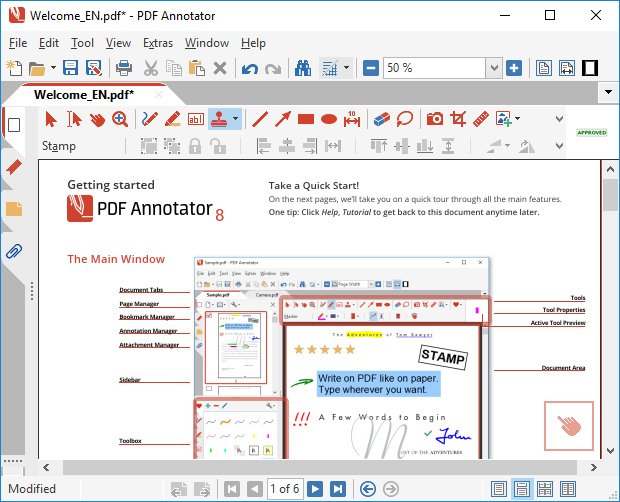
PDF Annotator lets the user open any PDF file and add annotations, using the mouse or a Tablet PC pen, directly on the PDF file's pages. The annotated documents can then be saved directly back to PDF format. In this way, anyone can read or print the annotated PDF documents. Annotated documents can also be easily attached to emails.
Previously, annotating, commenting or proofreading a document received for review in PDF file format was possible only by using multiple software products in a row--or only by printing the document and adding comments manually. With PDF Annotator, annotations can also be added in a natural way--using a pen--but everything remains in digital format. PDF Annotator allows commenting of PDF files in a single step.
FEATURES :
Annotation Manager in the Sidebar
• Get a quick overview of all annotations in a document.
• Navigate to any annotations quickly.
• Perform operations on any selection of annotations.
Filter Annotations
• Only display a filtered subset of your annotations in the new Annotations sidebar.
• Filter by type, color, or page number.
Print Annotations Overviews
• Print a detailed list with small previews of every single annotation in a document.
• Print an overview only outlining the pages containing annotations.
How to install:
- Install the App.
- Don't run the application and close from system tray or task manager if running.
- Copy from crack folder to install folder to activate the program.
- Done.
https://www.virustotal.com/gui/file/bd93a31065b02ad1340cc7fcca4124779aad617f69758aefd7bcdfee5a94c6dd
https://www.virustotal.com/gui/file/30ccf5893de70251f11cb1aa7464719b112dd4d598b9edd51aacfea0bcb8fbff